JDBC 相关API
基本介绍
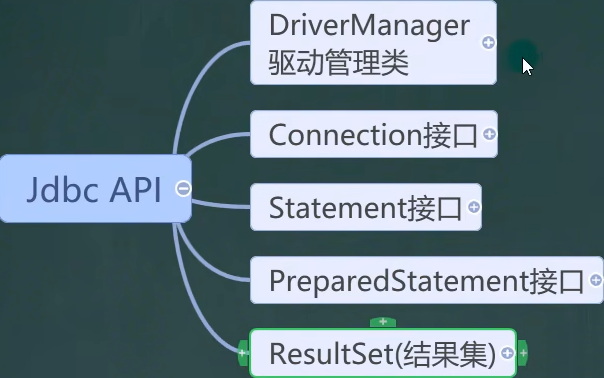
JDBC API 是一系列的接口,它统一和规范了应用程序与数据库的连接、执行 SQL 语句,并得到返回结果等各类操作,相关类和接口在 java.sql 和 javax.sql 包中
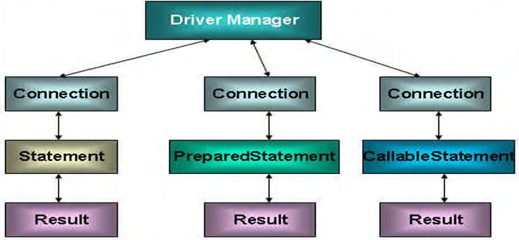
ResultSet(结果集)
基本介绍
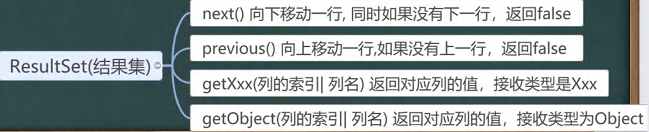
理解:相当有一个指针,指向表的每一行,类似于 iterator 的 hasnext 方法,如果为空,返回 false,之后通过相应的方法得到每一行的每一列内容

使用步骤
(1)通过 properties 读取配置文件信息
(2)注册驱动
(3)利用 DriverManager 的 getConnection()方法获取连接
(4)通过 Connection 对象得到 Statement 对象
(5)调用 Statement 对象的相关方法执行 sql 语句,返回结果集
(6)遍历结果集,使用循环遍历,输出结果
(7)关闭连接
相关方法
xxx:表示一种数据类型
getxxx(列索引):按照列索引返回该列的值
getxxx(列名):直接通过列名查找某一列,并返回该列的值
示例代码
java
public class Main {
    public static void main(String[] args) throws Exception {
        // 利用 properties 读取配置文件信息
        Properties properties = new Properties();
        properties.load(new FileInputStream("src/JDBC/connect.properties"));
        String user = properties.getProperty("user");
        String password = properties.getProperty("password");
        String url = properties.getProperty("url");
        String driver = properties.getProperty("driver");
        // 注册驱动
        Class<?> aClass = Class.forName(driver);
        // 获取连接
        Connection connection = DriverManager.getConnection(url, user, password);
        // 得到Statement
        Statement statement = connection.createStatement();
        // 执行 sql 语句
        String sql = "select id, name,sex from actor";
        // 获取 resultSet(结果集)
        ResultSet resultSet = statement.executeQuery(sql);
        // 使用while循环读取数据
        while (resultSet.next()){
            // 获取每一列数据
            int id = resultSet.getInt(1);
            String name = resultSet.getString(2);
            String sex = resultSet.getString(3);
            // 打印信息
            System.out.println(id + "\t" + name + "\t" + sex);
        }

        // 关闭连接
        resultSet.close();
        statement.close();
        connection.close();
    }
}Statement
基本介绍
用于执行静态 SQL 语句并返回其生成的结果的对象
DQL 语句
利用 ResultSet 完成查询,示例代码见上方
相关方法
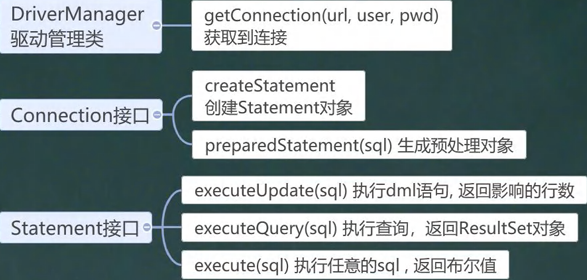
通过 connection 对象,调用 createStatement() 方法,得到 statement 对象,调用相关的方法
DQL 语句:executeQuery(),返回 ResultSet 对象
DML 语句
相关方法
通过 connection 对象,调用 createStatement() 方法,得到 statement 对象,调用相关的方法
DML 语句:executeUpate(),返回结果是影响的行数,大于 0:执行成功,否则执行失败
java
public class Main {
    public static void main(String[] args) throws Exception {
        // 利用 properties 读取配置文件信息
        Properties properties = new Properties();
        properties.load(new FileInputStream("src/JDBC/connect.properties"));
        String user = properties.getProperty("user");
        String password = properties.getProperty("password");
        String url = properties.getProperty("url");
        String driver = properties.getProperty("driver");
        // 注册驱动
        Class<?> aClass = Class.forName(driver);
        // 获取连接
        Connection connection = DriverManager.getConnection(url, user, password);
        // 得到Statement
        Statement statement = connection.createStatement();
        // 执行 sql 语句

/*
        // 添加
        String sql = "insert into actor values(null,'candy','女')";

        // 修改
        String sql = "update actor set name = 'fancy' where name = 'candy'";

*/

        // 删除
        String sql = "delete from actor where name='fancy'";

        // 获取 resultSet(结果集)
        int rows = statement.executeUpdate(sql);

        // 结果判断
        if (rows > 0) {
            System.out.println("执行成功");
        } else {
            System.out.println("执行失败");
        }

        // 关闭连接
        statement.close();
        connection.close();
    }
}SQL 注入问题
Statement 缺陷:容易产生 SQL 注入问题
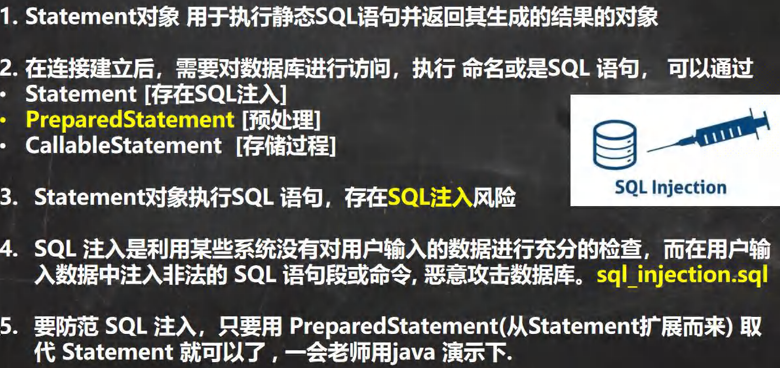
注入参数
用户名:1'or
万能密码:or'1'='1
bash
SELECT * FORM actor WHERE NAME='1'OR' AND pwd=' OR '1'='1'漏洞问题
登录时候,只要验证能查得到有人,则登录成功(因为 '1'='1' 这个条件永远成立,结果为真)
PrepareStatement
基本介绍
SQL 语句中的值都采用 " ?" 的方式占位,用实际参数填入,提高代码的灵活性,同时逻辑结构也更加清晰
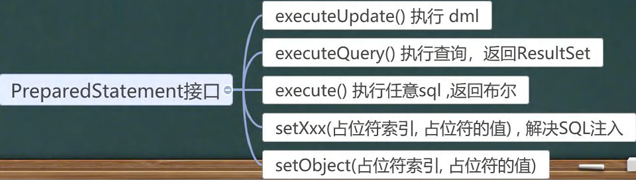
相关方法:得到 connection 对象后,使用 preparedStatement(sql) 方法得到 Statement 对象,然后调用一系列 set 方法给 sql 语句的?占位赋值
注意:关键字、列名、表名不能使用 ?,只用于动态变化的参数
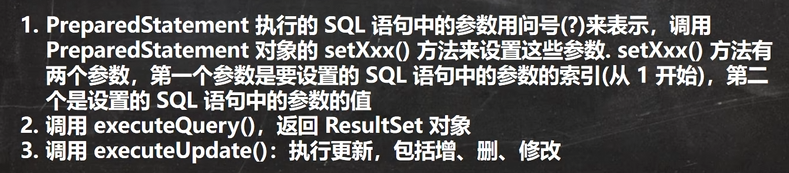
优势
(1)不再使用 + 拼接 SQL 语句,减少语法错误
(2)有效的解决了 SQL 问题
(3)大大减少了编译次数,效率较高
DQL 语句
java
public class Main {
    public static void main(String[] args) throws Exception {
        Properties properties = new Properties();
        properties.load(new FileInputStream("src/JDBC/connect.properties"));
        String user = properties.getProperty("user");
        String password = properties.getProperty("password");
        String url = properties.getProperty("url");
        String driver = properties.getProperty("driver");
        // 注册驱动
        Class<?> aClass = Class.forName(driver);
        // 获取连接
        Connection connection = DriverManager.getConnection(url, user, password);
        // sql 语句
        String sql = "select name,sex from actor where sex=?";
        // 获取 Statement 对象
        PreparedStatement preparedStatement = connection.prepareStatement(sql);
        // 利用set方法给 ? 占位赋值
        preparedStatement.setString(1, "男"); // 第一个问号
        // 调用方法执行 sql 语句(注意,这里不要传入 sql,已经通过prepareStatement的一系列set方法设置了参数)
        ResultSet resultSet = preparedStatement.executeQuery();
        // 循环遍历,打印信息
        while (resultSet.next()) {
            String name = resultSet.getString(1);
            String sex = resultSet.getString(2);
            System.out.println("姓名:" + name + "\t" + "性别:" + sex);
        }

        // 关闭资源
        resultSet.close();
        preparedStatement.close();
        connection.close();
    }
}DML 语句
调用executeUpate()方法,返回结果是影响的行数,大于 0:执行成功,否则执行失败
java
public class Main {
    public static void main(String[] args) throws Exception {
        Properties properties = new Properties();
        properties.load(new FileInputStream("src/JDBC/connect.properties"));
        String user = properties.getProperty("user");
        String password = properties.getProperty("password");
        String url = properties.getProperty("url");
        String driver = properties.getProperty("driver");
        // 注册驱动
        Class<?> aClass = Class.forName(driver);
        // 获取连接
        Connection connection = DriverManager.getConnection(url, user, password);
        // sql 语句
        String sql = "insert into actor values (null,?,?)"; // 添加

/*
        // 修改
        String sql = "update actor set name = ? where name = ?";

        // 删除
        String sql = "delete from actor where name= ?";
*/

        // 获取 Statement 对象
        PreparedStatement preparedStatement = connection.prepareStatement(sql);
        // 利用set方法给 ? 占位赋值
        preparedStatement.setString(1, "fancy"); // 第一个问号
        preparedStatement.setString(2, "女"); // 第二个问号
        // 调用方法执行 sql 语句(注意,这里不要传入 sql,已经通过prepareStatement的一系列set方法设置了参数)
        int rows = preparedStatement.executeUpdate();
        // 判断是否成功
        if (rows > 0) {
            System.out.println("执行成功");
        } else {
            System.out.println("执行失败");
        }
        // 关闭资源
        preparedStatement.close();
        connection.close();
    }
}⭐ 注意点
preparedstatement 是通过一些列 set 方法来给 sql 语句中的通配符 ? 赋值的,当调用相关方法( executeQuery( ) 或 executeUpdate( ) )时不需要传入 sql 语句,否则会出现语法错误(因为 ? 是不合规范的 sql 语句)
API 小结