
vscode 安装及配置
⭐ 安装包
软件安装包:https://pan.baidu.com/s/1Uq9xdDGIRQLgtodbfB1DUA?pwd=maw3
VSCode 官网下载地址:https://code.visualstudio.com/
mingw64 官网下载地址:https://sourceforge.net/projects/mingw-w64/
安装教程
配置环境变量
bash
自己的路径/mingw64/bin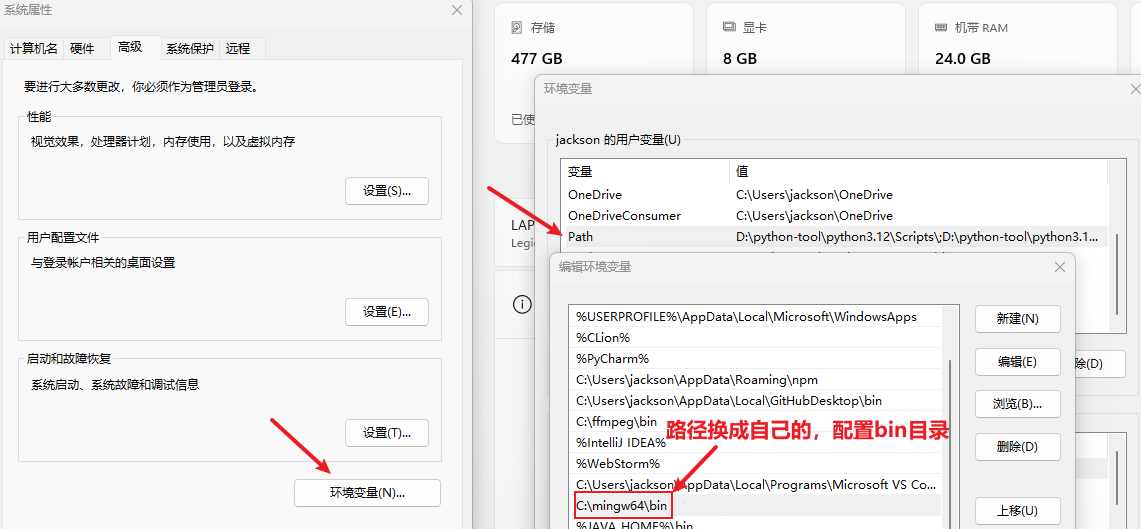
检测 gcc 配置
bash
where gcc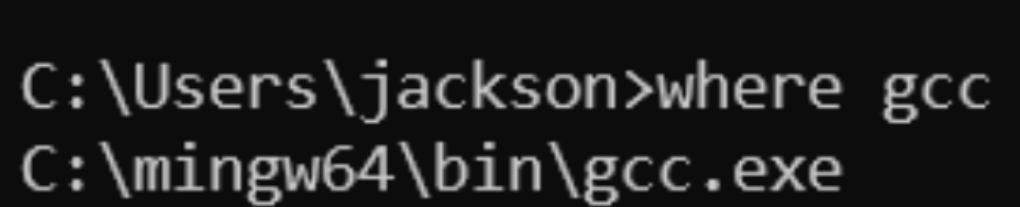
常见设置
设置字体:齿轮 > search > 搜索 "字体大小"
设置字体大小可以用滚轮控制:齿轮 > 设置 > 搜索 "Mouse Wheel Zoom"
设置左侧树缩进:齿轮 > 设置 > 搜索 "树缩进"
设置文件夹折叠:齿轮 > 设置 > 搜索 "compact" 取消第一个勾选
设置编码自动保存:齿轮 > 设置 > 搜索 "Auto Save",选择为 "afterDelay"
调整控制台字体大小
bash
terminal font size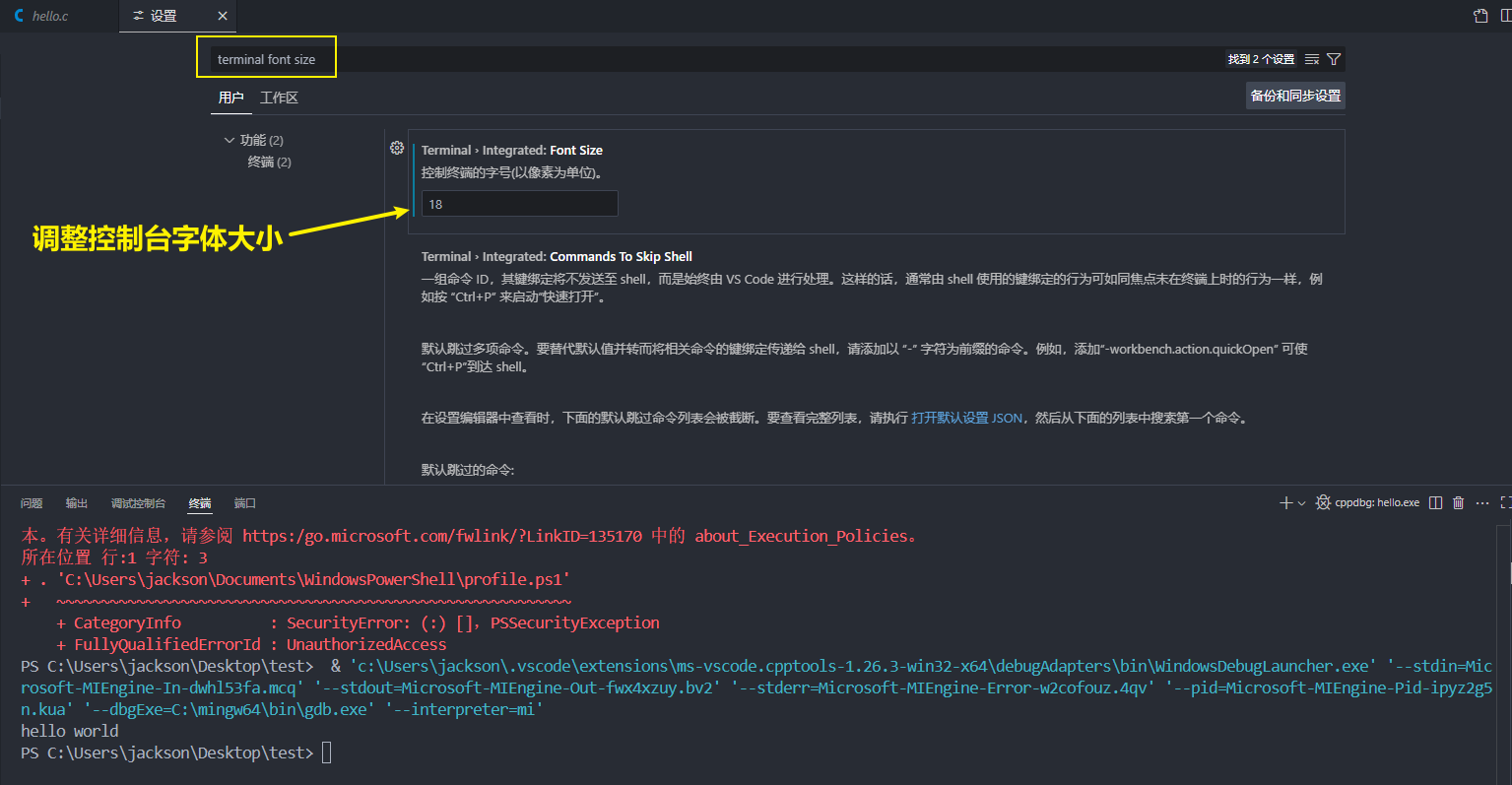
ctrl + 滚轮调整字体大小

配置 C/C++ 环境
参考视频
- 快速配置(使用插件运行):https://www.bilibili.com/video/BV1kR4y1M7R8/?spm_id_from=333.1387.favlist.content.click&vd_source=822e86b53dab98632ef279a46d2536db
- 快速配置(传统方式运行):https://www.bilibili.com/video/BV1tyAtetEd1/?spm_id_from=333.337.search-card.all.click
- 系统教程:https://www.bilibili.com/video/BV1356zYMEp5?spm_id_from=333.788.videopod.episodes&vd_source=822e86b53dab98632ef279a46d2536db&p=4
相关插件
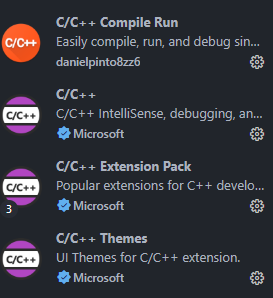
设置 C/C++ Compile Run,运行结果在 弹出的窗口 中显示
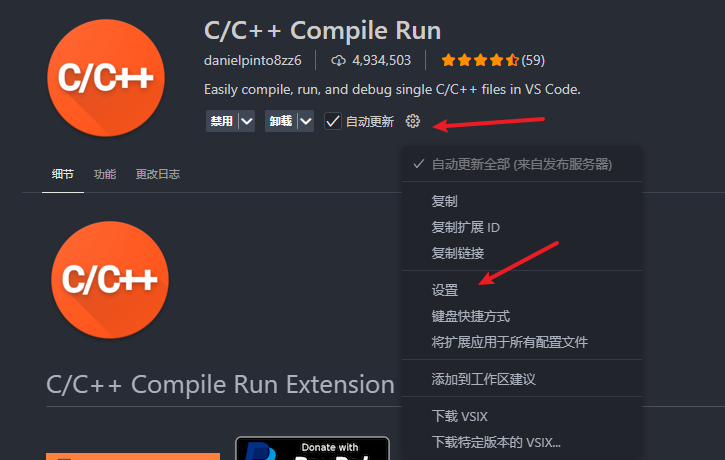
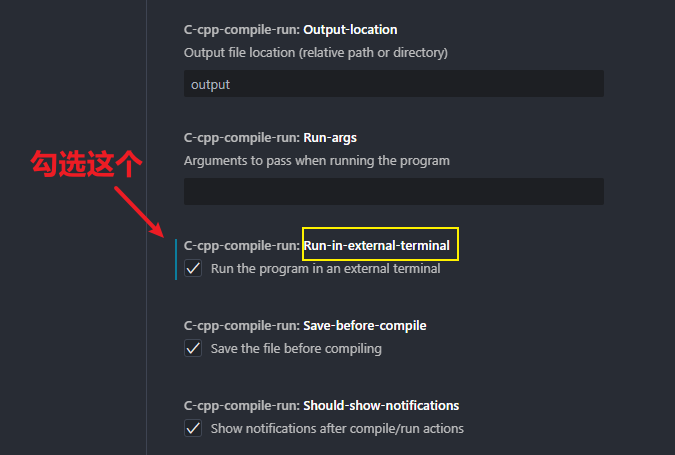
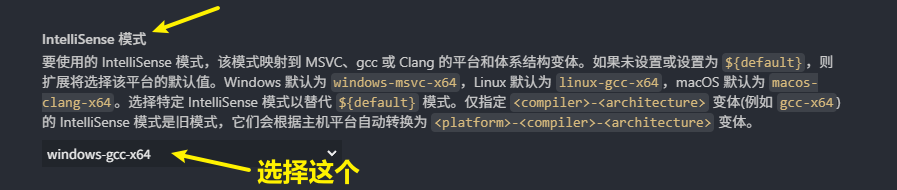
配置 C/C++
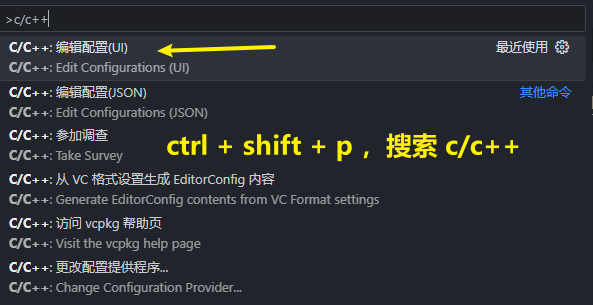
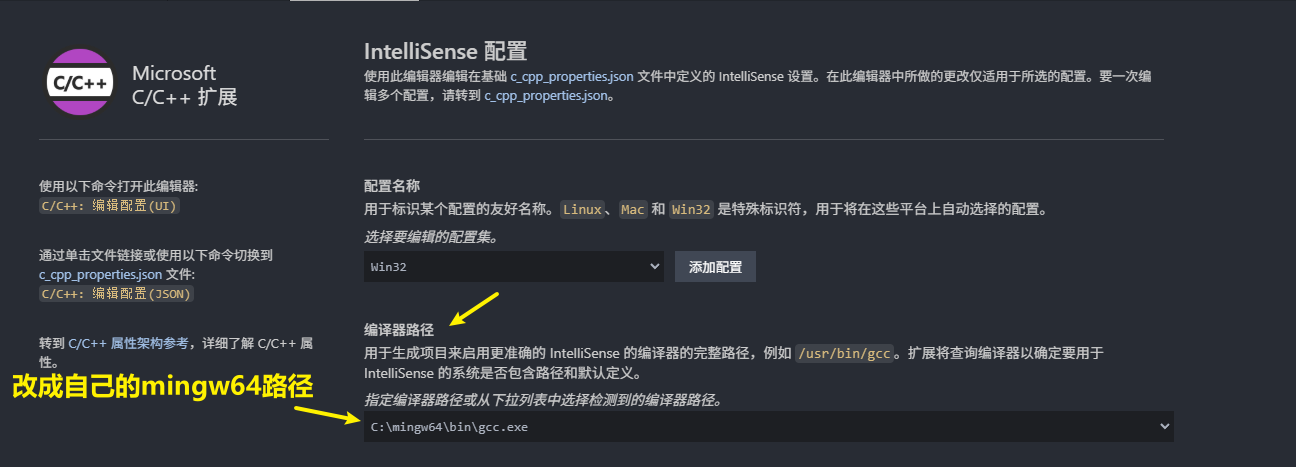
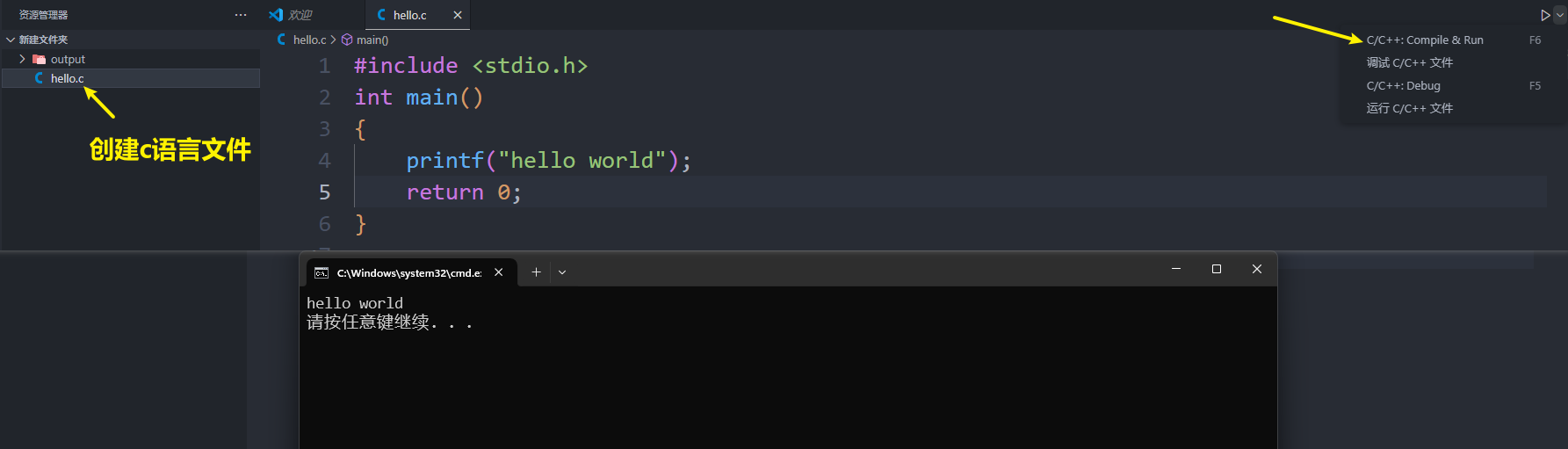
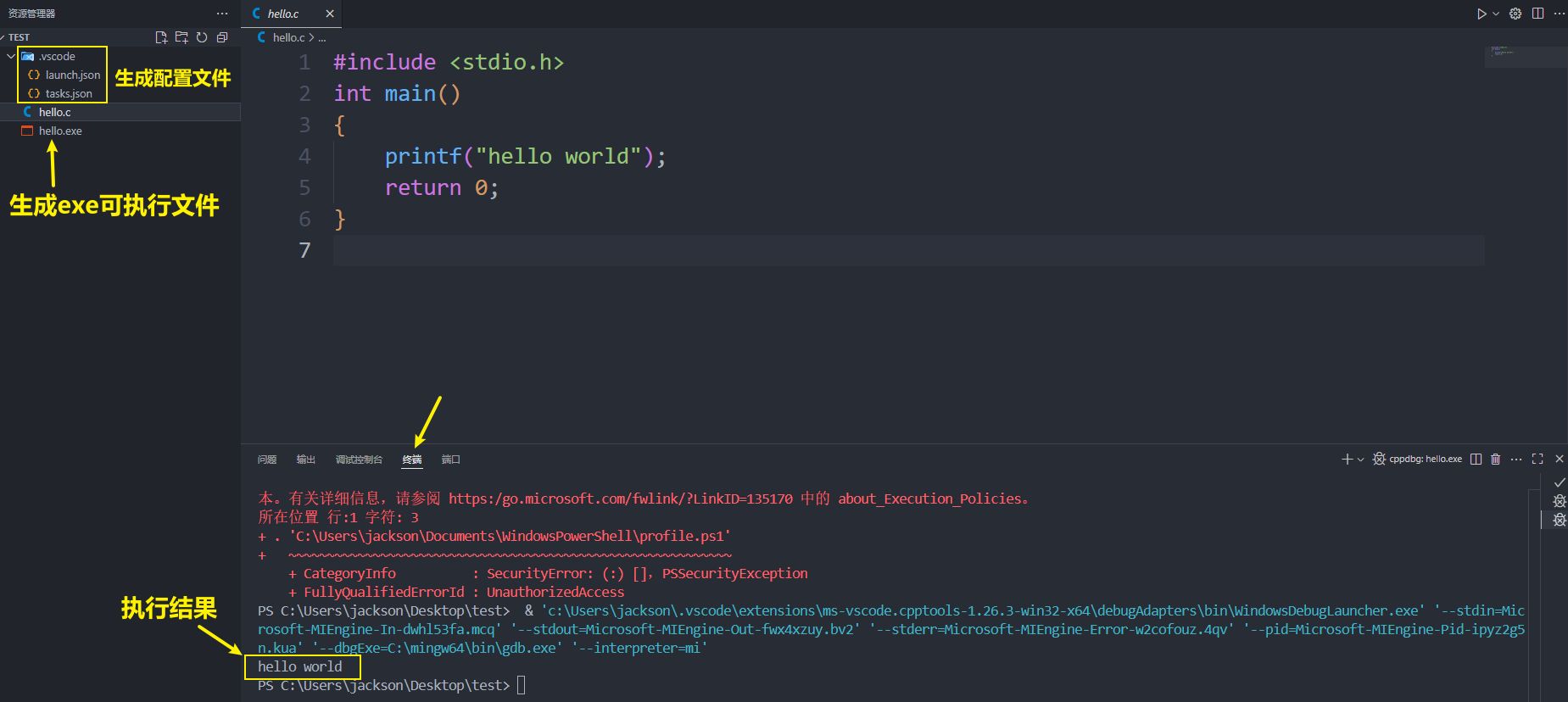
运行
使用插件运行
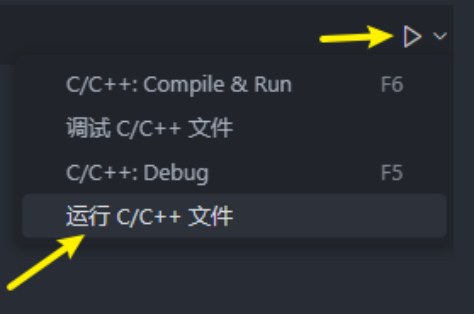
常规方法
注意点: 项目路径不能有中文 ,否则运行会报错
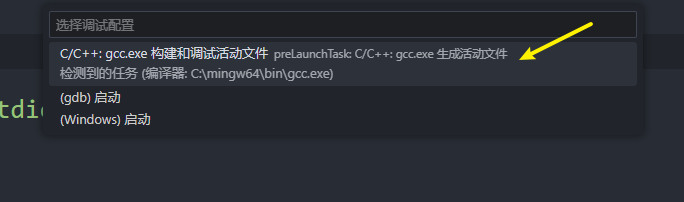
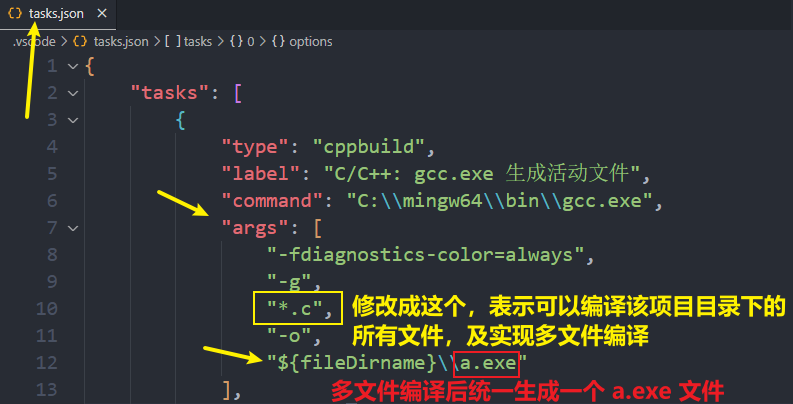
task.json 配置文件
多光标快捷键
选中多行同一位置
ctrl + alt + ⬆
ctrl + alt + ⬇
自定义多光标
alt + 鼠标左键
常用插件整理
前端开发
HTML CSS Support:HTML CSS 支持
JavaScript(ES6) code snippets:支持 ES6 语法提示
Vue 3 Snippets 在 Vue 2 或者 Vue3:提供语法高亮和格式化
Vue Official:一个专门为 Vue3 构建的语言支持插件
Vetur:VScode 中的 Vue 工具插件
Live Server:实时加载功能的小型服务器实时查看开发的网页或项目效果
Prettier-Code formatter:代码美化格式化插件
Mithril Emment:快速生成固定结构代码的插件
Auto Rename Tag:自动修改标签对插件
Auto Close Tag:自动闭合 HTML / XML 标签
Path Intellisense:路径提示插件
Image preview:链接图片时的图片预览插件
主题类
One Dark Pro:主题
One Monokai Theme:主题
Material Icon Theme:文件图标主题
markdown
Markdown Preview Enhanced:支持文章预览
Markdown Emoji:narkdown 支持 emoji,例如::smille: 语法将渲染为 😄
Markdown Auto Space:保存时自动在 数字 或者 英文字符 前后添加空格
json
// 在 setting.json 文件中配置如下内容,表示 Markdown Auto Space 插件在保存时只对数字和英文字符在前后添加空格
"markdownAutoSpace.formatOnSave": true,
"markdownAutoSpace.formatOnDocument": false,
"markdownAutoSpace.diagnostics.enable": true,

"markdownAutoSpace.rules": {
  "MAS001": true,
  "MAS002": false,
  "MAS003": false,
  "MAS004": false,
  "MAS005": false,
  "MAS006": false,
  "MAS007": false,
  "MAS008": false,
  "MAS009": false
}其他
Chinese(Simplified)(简体中文):中文汉化包
Lingma-Alibaba Cloud AI Coding Assistant:通义灵码插件
Error Lens:错误提示,警告
CodeSnap:代码截图
Material Icon Theme:文件图标美化
backgroud:设置背景图片
VSCode Animations:界面动画插件
Custom CSS and JS Loader:动画光标配置辅助插件,配置方法见视频:https://www.bilibili.com/video/BV1XtviBkEMr
Intellij IDEA Keybindings:IDEA 快捷键支持
Competitive Programming Helper(cph):提供算法测试用例
Codex:GTP 编程助手插件(用 GPT 账号登录即可使用)
界面美化
光标跳转美化
链接一:https://www.bilibili.com/video/BV1XtviBkEMr/
链接二:https://www.bilibili.com/video/BV1bVeLzbE5D/
界面动画
https://www.bilibili.com/video/BV161pneGE7o/
setting.json 文件配置
json
{
  "editor.fontSize": 20,
  "editor.mouseWheelZoom": true,
  "files.autoGuessEncoding": true,
  "c-cpp-compile-run.run-in-external-terminal": true,
  "editor.stickyScroll.enabled": false,
  "editor.smoothScrolling": true,
  "workbench.list.smoothScrolling": true,
  "terminal.integrated.smoothScrolling": true,
  "editor.cursorBlinking": "smooth",
  "editor.cursorSmoothCaretAnimation": "on",
  "editor.wordWrap": "on",
  "editor.acceptSuggestionOnEnter": "smart",
  "editor.suggestSelection": "recentlyUsed",
  "window.dialogStyle": "custom",
  "debug.showBreakpointsInOverviewRuler": true,
  "editor.formatOnSave": true,
  "editor.formatOnPaste": true,
  "editor.formatOnType": true,
  "editor.lineHeight": 1.8,
  "editor.tabSize": 4,
  "editor.codeActionsOnSave": {
    "source.fixAll": "explicit"
  },
  "git.confirmSync": false,
  "terminal.integrated.defaultProfile.windows": "Command Prompt",
  "chat.commandCenter.enabled": false,
  "markdown-preview-enhanced.codeBlockTheme": "auto.css",
  "markdown-preview-enhanced.previewTheme": "github-light.css",
  "markdown-preview-enhanced.revealjsTheme": "none.css",
  "explorer.compactFolders": false,
  "editor.minimap.showSlider": "always",
  "terminal.integrated.fontSize": 18,
  "liveServer.settings.donotShowInfoMsg": true,
  "[jsonc]": {
    "editor.defaultFormatter": "esbenp.prettier-vscode"
  },
  "[html]": {
    "editor.defaultFormatter": "esbenp.prettier-vscode"
  },
  "[vue]": {
    "editor.defaultFormatter": "esbenp.prettier-vscode"
  },
  "json.schemas": [],
  "[css]": {
    "editor.defaultFormatter": "vscode.css-language-features"
  },
  "vscode_custom_css.imports": [
    "file:///D:/vscode-neovide-cursor-main/neovide-cursor.js",
    "file:///c:/Users/jackson/.vscode/extensions/brandonkirbyson.vscode-animations-2.0.7/dist/updateHandler.js"
  ],
  "animations.CursorAnimation": true,
  "animations.CursorAnimationOptions": {
    "TrailLength": 8
  },
  "background.fullscreen": {
    "images": ["file:///D:/资料整理/文档整理/IDEA背景壁纸/背景图片.png"],
    "opacity": 0.65,
    "size": "cover",
    "position": "center",
    "interval": 0,
    "random": false
  },
  "workbench.colorTheme": "One Dark Pro Darker",
  "workbench.iconTheme": "material-icon-theme",
  "workbench.secondarySideBar.defaultVisibility": "visible",
  "http.systemCertificatesNode": true,
  "chatgpt.localeOverride": "zh-CN",
  "prettier.bracketSameLine": true
}