
JDBC 基本介绍
基本介绍
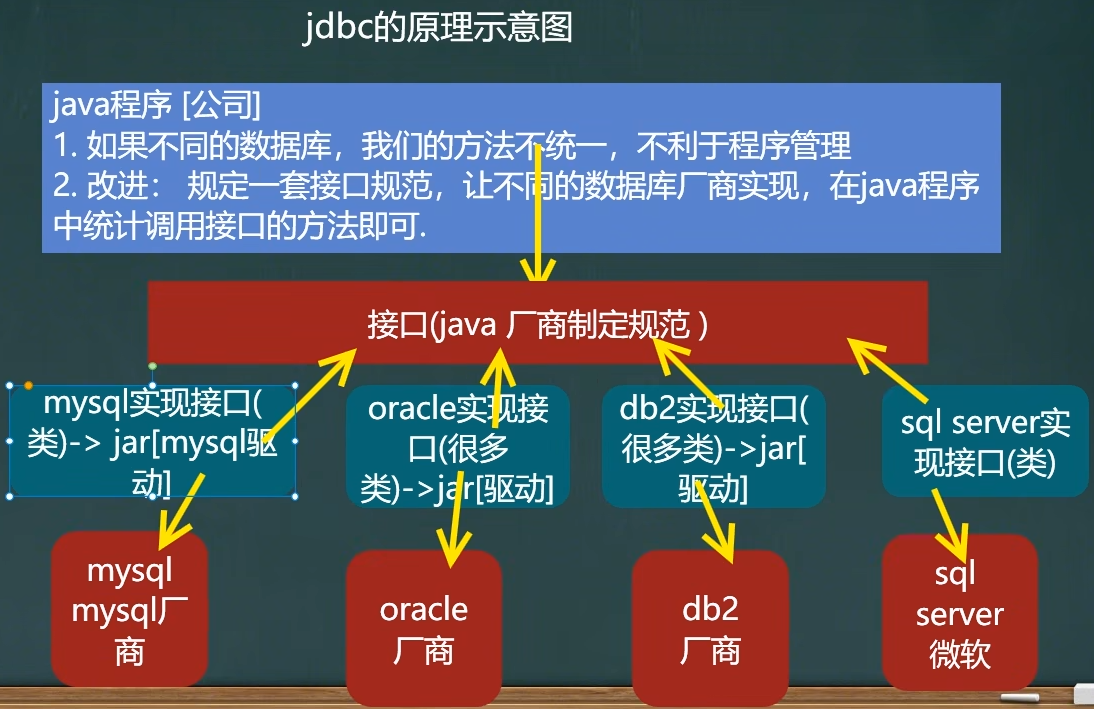
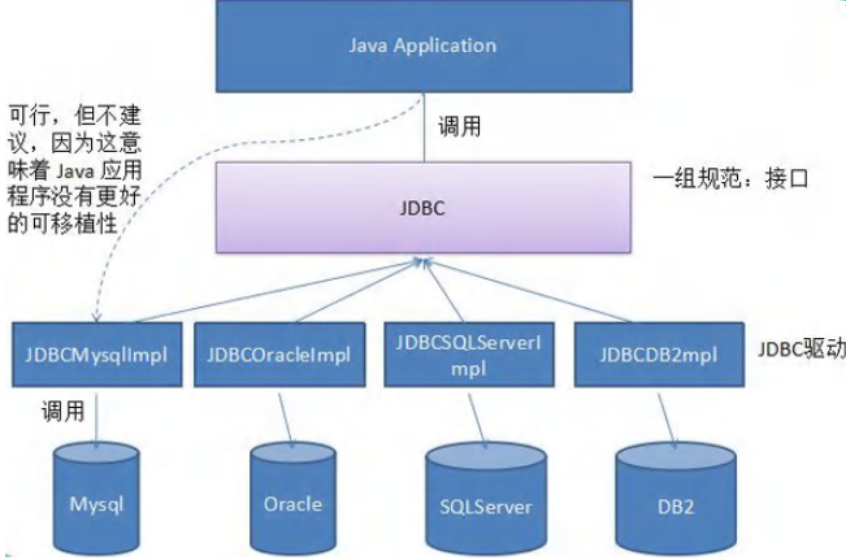
(1)JDBC 是 Java 提供一套用数据库操作的接口 API,Java 程序员只需要面向这套接口编程即可,为使用者屏蔽了细节问题,不同的数据库厂商,需要针对这套接口,提供不同的实现
(2)Java 程序员使用 JDBC,可以连接任何提供了JDBC 驱动程序的数据库系统,从而完成对数据库的各种操作
示意图
连接方法
获取 mysql-connector-java-5.1.37-bin.jar
安装包: https://pan.baidu.com/s/1hNC1vSXbkvOGnHNJS0SqaQ?pwd=3tn6 提取码: 3tn6
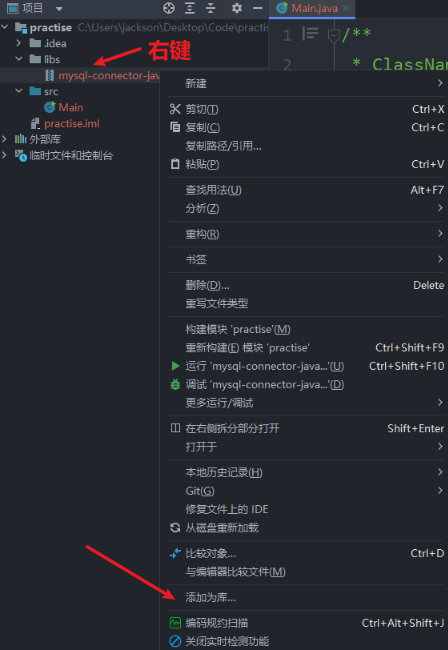
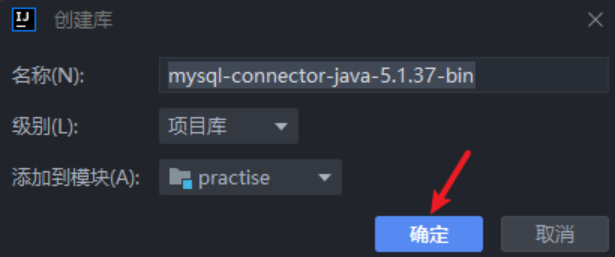
连接步骤
(1)注册驱动:加载 Driver 类
(2)获取连接:得到 Connection
(3)执行增删改查:发送 SQL 语句给 MySQL 执行
(4)释放资源:关闭相关连接
方法一
步骤
(1)创建 Driver 对象
(2)指定连接的数据库
url = "jdbc:mysql://数据库地址:端口号/数据库名"
固定写法:jdbc:mysql://
(3)利用 properties 对象设置登录信息
(4)调用 Driver 对象的 connect 方法,传入数据库地址和登录信息,完成连接
java
public class Main {
    public static void main(String[] args) throws Exception {
        // 创建 Driver 对象
        Driver driver = new Driver();

        /*
            指定连接的数据库
            (1)固定写法  jdbc:mysql://
            (2)填写  数据库地址:端口//数据库名
         */
        String url = "jdbc:mysql://localhost:3306/jdbc";

        // 用 properties 对象存储用户登录信息
        Properties properties = new Properties();
        // 用户名
        properties.setProperty("user","root");
        // 密码
        properties.setProperty("password","");
        // 获取连接
        Connection connect = driver.connect(url, properties);
        System.out.println(connect);
    }
}方法二
和方式一大同小异,区别在于使用反射和加载类信息,提高灵活性,减少依赖
java
public class Main {
    public static void main(String[] args) throws Exception {
        // 利用反射动态加载 Driver类,提高灵活性,减少依赖
        Class<?> clazz = Class.forName("com.mysql.jdbc.Driver");
        Driver driver = (Driver) clazz.newInstance();
        // 数据库地址
        String url = "jdbc:mysql://localhost:3306/jdbc";
        // 设置登录信息
        Properties properties = new Properties();
        properties.setProperty("user","root");
        properties.setProperty("password","");
        // 获取连接
        Connection connect = driver.connect(url, properties);
        System.out.println(connect);
    }
}方法三
连接时候使用 DriverManager 的 registerDriver 方法注册驱动
调用 getConnection(url,user,password) 方法连接
java
public class Main {
    public static void main(String[] args) throws Exception {
        // 利用反射动态加载 Driver类,提高灵活性,减少依赖
        Class<?> clazz = Class.forName("com.mysql.jdbc.Driver");
        Driver driver = (Driver) clazz.newInstance();
        // 设置信息
        String url = "jdbc:mysql://localhost:3306/jdbc";
        String user = "root";
        String password = "";
        // 注册驱动
        DriverManager.registerDriver(driver);
        // 获取连接
        Connection connection = DriverManager.getConnection(url, user, password);
        System.out.println(connection);
    }
}⭐ 方法四
区别方法三,方法四不用注册驱动,同样可以完成连接
解释:在加载 Driver 类时,底层有静态代码块,类加载时完成了驱动的注册
底层源码
javastatic { try { DriverManager.registerDriver(new Driver()); } catch (SQLException var1) { throw new RuntimeException("Can't register driver!"); } }
java
public class Main {
    public static void main(String[] args) throws Exception {
        // 利用反射动态加载 Driver类,提高灵活性,减少依赖
        Class<?> clazz = Class.forName("com.mysql.jdbc.Driver");
        Driver driver = (Driver) clazz.newInstance();
        // 设置信息
        String url = "jdbc:mysql://localhost:3306/jdbc";
        String user = "root";
        String password = "";
        // 获取连接
        Connection connection = DriverManager.getConnection(url, user, password);
        System.out.println(connection);
    }
}温馨提醒

最后简化如下
java
public class Main {
    public static void main(String[] args) throws Exception {
        // 设置信息
        String url = "jdbc:mysql://localhost:3306/jdbc";
        String user = "root";
        String password = "";
        // 获取连接
        Connection connection = DriverManager.getConnection(url, user, password);
        System.out.println(connection);
    }
}⭐ 方法五
改进方法四,动态变化登录信息,写在配置文件中,利用 properties 加载配置文件,获取相关信息
配置文件信息(等号两边不要有空格)
java
user=root
password=
url=jdbc:mysql://localhost:3306/jdbc
driver=com.mysql.jdbc.Driver代码如下
java
public class Main {
    public static void main(String[] args) throws IOException, ClassNotFoundException, SQLException {
        // 利用 properties 读取配置文件信息
        Properties properties = new Properties();
        properties.load(new FileInputStream("src/JDBC/connect.properties"));
        String user = properties.getProperty("user");
        String password = properties.getProperty("password");
        String url = properties.getProperty("url");
        String driver = properties.getProperty("driver");
        // 加载类(可以不写)
        Class<?> aClass = Class.forName(driver);
        // 获取连接
        Connection connection = DriverManager.getConnection(url, user, password);
        System.out.println(connection);
    }
}