
JDBC 连接池
问题引入
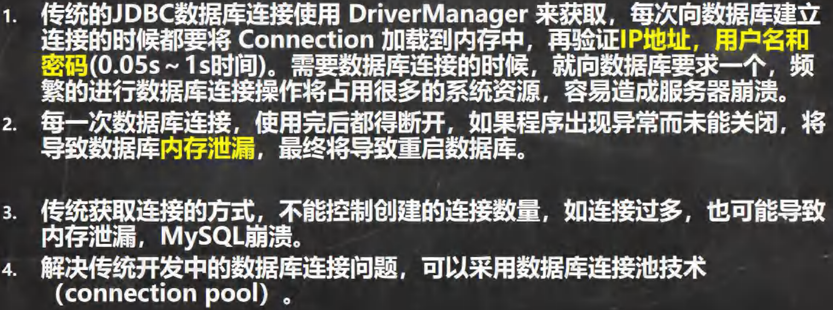
实际开发中,数据库的连接是非常多的,然而数据库的连接是有限的,如果同一时间过多连接可能会导致数据库崩溃,内存泄漏,数据库连接的多了之后,其他连接的连接速度也会明显延长
基本介绍

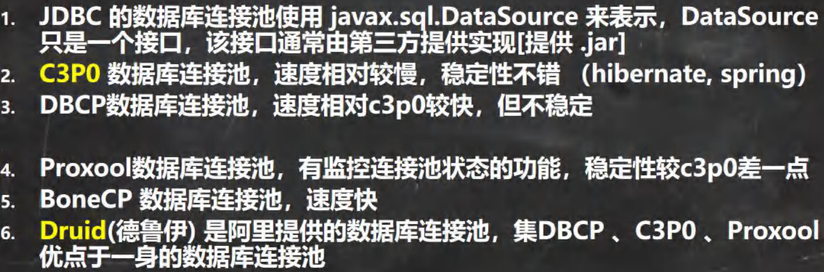
连接池种类
C3P0
引入外部库
获取 c3p0-0.9.1.2
安装包: https://pan.baidu.com/s/1hNC1vSXbkvOGnHNJS0SqaQ?pwd=3tn6 提取码: 3tn6
使用方法:拷贝 jar 包到 libs 文件目录下,右键添加为库,可以参考前面获取 mysql-connector-java-5.1.37-bin.jar 的操作
基本介绍
在引入的外部库中有一个类:ComboPooledDataSource
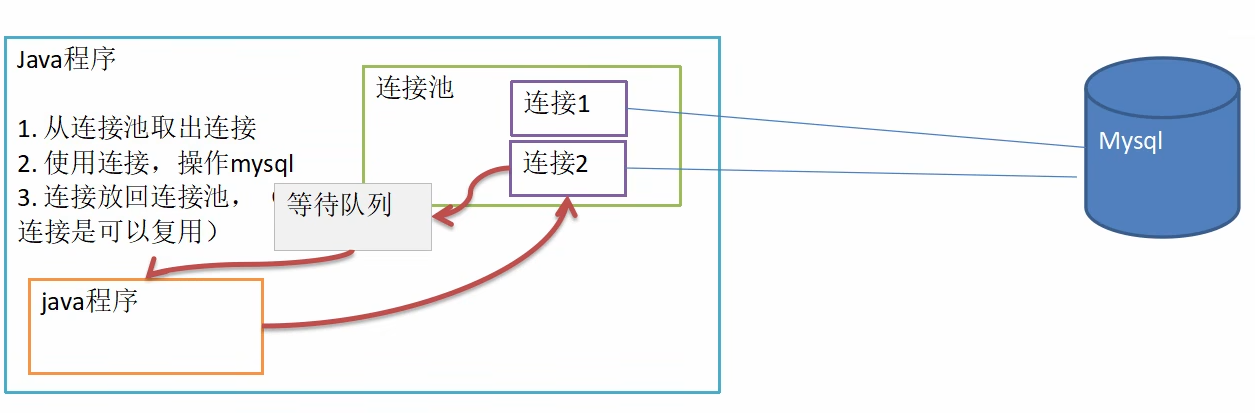
这个是数据源类,即连接池,在这其中可以设置多个连接对象,提供给多个 Java 程序与数据库连接,当达到最大连接数时,则连接请求将加入等待队列中
相关方法
设置数据源对象的初始信息
setUser( )
setPassword( )
setJdbcUrl( )
setDriverClass( )
setInitialPoolSize( ):初始化连接数量
setMaxPoolSize( ):最大连接数
获取连接
getConnection()
⭐close()方法
ComboPooledDataSource.close() → 关闭整个连接池(销毁所有连接)
连接方法一(手动配置)
java
public static void connection() throws Exception {
    // 创建数据源对象(连接池)
    ComboPooledDataSource comboPooledDataSource = new ComboPooledDataSource();

    // 获取配置信息
    Properties properties = new Properties();
    properties.load(new FileInputStream("src/JDBC/connect.properties"));
    String user = properties.getProperty("user");
    String password = properties.getProperty("password");
    String url = properties.getProperty("url");
    String driver = properties.getProperty("driver");

    // 设置数据源的相关参数
    comboPooledDataSource.setUser(user);
    comboPooledDataSource.setPassword(password);
    comboPooledDataSource.setJdbcUrl(url);
    comboPooledDataSource.setDriverClass(driver);

    // 初始化连接数
    comboPooledDataSource.setInitialPoolSize(5);
    // 最大连接数
    comboPooledDataSource.setMaxPoolSize(10);

    // 测试连接速度
    long start = System.currentTimeMillis();
    for (int i = 0; i < 999999; i++) {
        Connection connection = comboPooledDataSource.getConnection();
        connection.close();
    }
    long end = System.currentTimeMillis();
    System.out.println("总耗时:" + (end - start));
}连接方法二(XML 文件)
创建 c3p0-config.xml 配置文件,拷贝到 src 目录下
区别于方法一,方法二把所有相关的配置信息都写在了配置文件中,直接读取即可,提高效率
相关方法:new ComboPooledDataSource(" 数据源名称(config-name)")
c3p0-config.xml 配置文件
xml
<c3p0-config>
    <!--数据源名称代表连接池-->
    <named-config name="connectionPool">
        <!-- 驱动类 -->
        <property name="driverClass">com.mysql.jdbc.Driver</property>

        <!-- url-->
        <property name="jdbcUrl">jdbc:mysql://localhost:3306/jdbc</property>

        <!-- 用户名 -->
        <property name="user">root</property>

        <!-- 密码 -->
        <property name="password"></property>

        <!-- 每次增长的连接数-->
        <property name="acquireIncrement">5</property>

        <!-- 初始的连接数 -->
        <property name="initialPoolSize">10</property>

        <!-- 最小连接数 -->
        <property name="minPoolSize">5</property>

        <!-- 最大连接数 -->
        <property name="maxPoolSize">10</property>

        <!-- 可连接的最多的命令对象数 -->
        <property name="maxStatements">5</property>

        <!-- 每个连接对象可连接的最多的命令对象数 -->
        <property name="maxStatementsPerConnection">2</property>
    </named-config>
</c3p0-config>示例代码
java
public static void Xml_Connection() throws Exception{
    // 使用配置文件模板
    ComboPooledDataSource connectionPool = new ComboPooledDataSource("connectionPool");
    // 测试连接速度
    long start = System.currentTimeMillis();
    for (int i = 0; i < 999999; i++) {
        Connection connection = connectionPool.getConnection();
        connection.close();
    }
    long end = System.currentTimeMillis();
    System.out.println("总耗时:" + (end - start));
}Druid(德鲁伊)
引入外部库
获取 druid-1.1.10
安装包: https://pan.baidu.com/s/1hNC1vSXbkvOGnHNJS0SqaQ?pwd=3tn6 提取码: 3tn6
使用方法:拷贝 jar 包到 libs 文件目录下,右键添加为库,可以参考前面获取 mysql-connector-java-5.1.37-bin.jar 的操作
引入配置文件
druid.properties
bash
#key=value
driverClassName=com.mysql.jdbc.Driver
#url=jdbc:mysql://localhost:3306/jdbc
url=jdbc:mysql://localhost:3306/jdbc?rewriteBatchedStatements=true
username=root
password=
#initial connection Size
initialSize=10
#min idle connecton size
minIdle=5
#max active connection size
maxActive=20
#max wait time (5000 mil seconds)
maxWait=5000相关方法
创建 druid.properties 配置文件,把相关的配置信息写在文件中
获取数据源对象:DruidDataSourceFactory.createDataSource(" property 对象 ")
获取连接:getConnection()
⭐ 关闭连接
并不是真的断掉连接,只是把使用的 Connection 对象放回连接池中
原因:可以用 getclass()方法查看 Druid 的运行类型,close 方法是根据 Druid 底层来实现的
⭐ 封装为 JDBCUtils
java
public class JDBCUtils_Druid {
    private static DataSource dataSource;

    // 静态代码块初始化
    static {
        // 读取配置文件信息
        Properties properties = new Properties();

        try {
            properties.load(new FileInputStream("src/druid.properties"));
            dataSource = DruidDataSourceFactory.createDataSource(properties);
        } catch (Exception e) {
            e.printStackTrace();
        }

    }

    // 连接方法
    public static Connection getConnection() throws SQLException {
        return dataSource.getConnection();
    }

    // 关闭连接(注意:这里不是真的断掉连接,只是把使用的Connection对象放回连接池)
    public static void close(ResultSet resultSet, Connection connection, Statement statement){
        try {
            if (resultSet != null) {
                resultSet.close();
            }
            if (connection != null) {
                connection.close();
            }
            if (statement != null) {
                statement.close();
            }
        } catch (SQLException e) {
            /*
                实际开发中常用下面的方式处理
                1. 将编译异常转为运行异常
                2. 调用者可以选择捕获该异常,也可以选择默认处理该异常,比较方便
             */
            throw new RuntimeException(e);
        }
    }
}示例代码
java
public class JDBCUtils_test {
    public static void main(String[] args) {
        // 定义变量
        Connection connection = null;
        PreparedStatement preparedStatement = null;
        ResultSet resultSet = null;
        // sql 语句
        String sql = "insert into actor values (null,?,'男')";
        try {
            // 获取连接
            connection = JDBCUtils_Druid.getConnection();
            preparedStatement = connection.prepareStatement(sql);
            System.out.println("开始执行...");
            for (int i = 0; i < 500; i++) {
                preparedStatement.setString(1, "john" + (i + 1));
                // 添加到批处理包中
                preparedStatement.addBatch();
                // 自定义处理的批处理的记录数(下方单次处理 100 条记录)
                if ((i + 1) % 100 == 0) {
                    // 批量执行
                    preparedStatement.executeBatch();
                    // 清空批处理包
                    preparedStatement.clearBatch();
                }
            }
            int rows = preparedStatement.executeUpdate();
            if (rows > 0) {
                System.out.println("执行成功");
            } else {
                System.out.println("执行失败");
            }
        } catch (SQLException e) {
            throw new RuntimeException(e);
        } finally {
            JDBCUtils_Druid.close(resultSet, connection, preparedStatement);
        }
    }
}